
In This Article
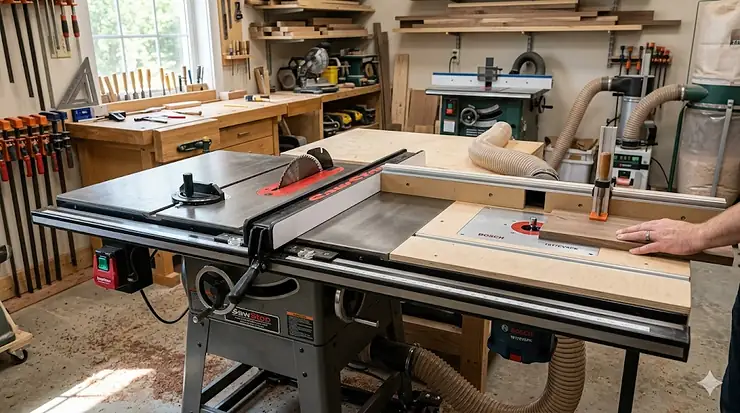
Setting up a professional woodworking shop used to mean sacrificing precious floor space for multiple machines. I’ve watched countless woodworkers struggle with this dilemma—until they discovered the game-changing solution of integrating a router table with their cabinet saw. This setup transforms two separate operations into a unified workflow station that saves space while actually improving precision.
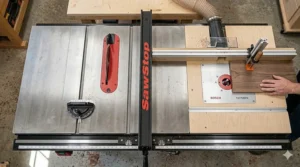
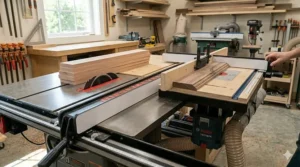
The cabinet saw with router table configuration isn’t just about convenience. When you mount a router table to your cabinet saw’s extension wing or replace the standard table with a dedicated router surface, you’re leveraging the saw’s mass and stability to eliminate router vibration—the hidden enemy of clean edge profiles. What most buyers overlook is how this integration affects dust collection: a single 4-inch port can handle both operations when properly configured, versus managing two separate systems that never quite coordinate.
For professional cabinet makers and serious hobbyists, this combination addresses a fundamental workflow problem. You’re constantly moving between ripping stock and routing profiles, dadoes, or edge treatments. Having both capabilities within arm’s reach means you spend more time cutting and less time repositioning workpieces between stations. The fence system on premium cabinet saws can often double as a router fence with minimal adjustment, creating seamless transitions between operations that would otherwise require complete setup changes.
Quick Comparison Table: Top Cabinet Saw Router Solutions
| Model | Motor Power | Router Table Type | Best For | Price Range |
|---|---|---|---|---|
| Grizzly G1023RLW | 3 HP | Built-in Cast Iron | Budget-Conscious Pros | $2,400-$2,800 |
| SawStop PCS with RT-TGP | 3 HP | In-Line Cast Iron | Safety-First Workshops | $3,500-$4,200 |
| Grizzly G1023RLWX | 5 HP | Built-in Cast Iron | Heavy Production | $3,200-$3,700 |
| Powermatic PM66 with Lift | 5 HP | Extension with Lift | Premium Performance | $4,500-$5,500 |
| Shop Fox W1819 + W1821 | 3 HP | Cast Iron Attachment | Value Seekers | $2,000-$2,500 |
| Kreg Router Lift System | N/A (retrofit) | Universal Lift | DIY Integrators | $350-$450 |
| Bosch RA1181 (Adapted) | N/A (retrofit) | Aluminum Benchtop | Space-Limited Shops | $220-$280 |
Looking at this comparison, the Grizzly G1023RLW emerges as the sweet spot for woodworkers who want factory-integrated router functionality without breaking into premium pricing territory. If your priority is absolute safety and you’re routing daily, the SawStop system’s flesh-detection technology justifies the price premium—a single prevented injury pays for the difference. Budget-conscious buyers should note that the Shop Fox W1819 with the W1821 attachment delivers 90% of the performance at roughly 60% of the cost, though you’ll sacrifice some of the seamless integration found in purpose-built models.
💬 Just one click—help others make better buying decisions too! 😊
Top 7 Cabinet Saw with Router Table Systems: Expert Analysis
1. Grizzly G1023RLW – The Integrated Workhorse
The Grizzly G1023RLW arrives as a complete solution with its router table built directly into the right extension wing, eliminating the awkward gaps and alignment issues that plague aftermarket installations. This 10-inch cabinet saw couples a 3 HP, 240V motor with a precision-ground cast iron table that extends seamlessly into the router section.
Here’s what separates this from bolt-on solutions: the Shop Fox Classic Fence system doubles as both table saw and router fence, meaning you’re not constantly swapping between two separate fence systems. For dado operations, this means you can cut perfectly straight channels on the table saw side, then route decorative profiles on the same workpiece without moving your fence reference point. The motor handles 13/16-inch dado stacks without bogging down, while the router table accommodates full-size routers—skip the trim routers, as the mounting plate won’t accept their compact bases.
From a practical standpoint, the 50-inch rip capacity paired with the integrated router table creates a total workspace that replaces two separate stations. Customer feedback consistently highlights the T-track router clamping system as a standout feature, allowing quick router mounting without the screw-and-tighten routine that adds 10 minutes to every setup. The universal mounting system accepts most Porter Cable, Bosch, and DeWalt routers without adapter plates.
The weight—approximately 550 pounds fully assembled—means this saw plants itself permanently wherever you position it, which is actually an advantage for vibration dampening. One reality check: assembly requires two people and roughly 4-6 hours, as you’re essentially building two machines in one frame.
Pros:
✅ Factory-integrated router eliminates alignment headaches
✅ Dual-purpose fence saves constant adjustments
✅ Cast iron construction throughout both surfaces
Cons:
❌ Router table won’t accommodate compact trim routers
❌ Requires 240V circuit (electrician cost for most home shops)
This setup typically runs in the $2,400-$2,800 range depending on dealer promotions. For production woodworkers or cabinet makers who route as much as they rip, the factory integration alone saves 15-20 hours of custom fabrication work that aftermarket solutions demand.
2. SawStop PCS31230 with RT-TGP Router Table – Safety Meets Routing Excellence
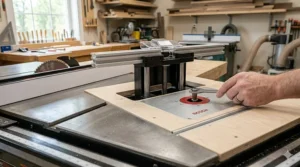
The SawStop Professional Cabinet Saw paired with the RT-TGP router table assembly represents the pinnacle of shop safety integrated with precision routing. What makes this combination extraordinary isn’t just the flesh-detection technology (though stopping a spinning blade in 5 milliseconds has saved countless fingers)—it’s how SawStop engineered the router table to share the same T-Glide fence system that makes the cabinet saw legendary.
The 27-inch x 16-inch cast iron router surface mounts either in-line between the rails (replacing your extension table) or to the left wing, depending on your workflow preference. In-line mounting creates a continuous cast iron work surface spanning your entire saw, while left-side mounting preserves maximum rip capacity. The router table includes precision-machined fence channels that integrate directly with the Professional Cabinet Saw’s fence, meaning your fence settings transfer between saw and router operations with zero adjustment.
What the spec sheet won’t tell you: the external power switch positioning lets you kill router power without reaching under the table mid-operation, a subtle safety feature that proves invaluable when bit chatter signals trouble. The 2.25-inch dust port integrates with most 4-inch dust collection systems via a reducer, and the adjustable fence faces with included shims let you zero-clearance any bit profile without custom inserts.
Customer reports emphasize the routing quality improvements versus standalone tables. The SawStop cabinet’s 300-pound mass eliminates the router vibration that degrades edge quality on lighter benchtop units. For architectural millwork where precision matters, this stability difference shows up in cleaner shoulders on dados and smoother profile transitions.
Pros:
✅ Flesh-detection safety extends to router work zone
✅ Unified T-Glide fence system across both operations
✅ Multiple mounting configurations for workshop layout flexibility
Cons:
❌ Premium pricing in the $3,500-$4,200 range for the combo
❌ Router lift sold separately (add $600-$800 for RT-LFT lift)
For professional shops where router operations represent 30%+ of daily work, the SawStop combination justifies its cost through injury prevention alone. Hobbyists should honestly assess whether the safety premium aligns with their usage frequency—if you’re routing weekly, yes; if monthly, perhaps redirect funds toward bit quality.
3. Grizzly G1023RLWX – The 5 HP Production Beast
When the 3 HP G1023RLW doesn’t quite deliver enough torque for sustained hardwood routing, Grizzly steps up with the G1023RLWX sporting a 5 HP motor that handles everything from 3-inch oak ripping to heavy raised-panel bits without speed loss. This isn’t a minor upgrade—that extra 2 HP transforms how the saw responds to demanding router operations like large-diameter panel-raising bits that bog down lesser motors.
The router table configuration mirrors its 3 HP sibling: built-in cast iron table replacing the right extension wing, Shop Fox Classic Fence doubling for both operations, and universal T-track mounting. But the real-world difference emerges when you’re running a 3.5-inch raised panel bit through figured maple—the motor maintains consistent RPM where smaller saws start laboring. For production cabinet shops processing 20+ doors per week, this consistency means uniform profiles across all pieces rather than the slight variations that creep in when motor speed fluctuates.
The dust collection benefits from the extra motor power too. The 4-inch port pulls stronger negative pressure, capturing more fine dust from both saw and router operations. What most reviews miss: the heavier trunnion system (supporting the beefier motor) translates to less vibration transmitted through the table to your router work, resulting in cleaner edge treatments on challenging grain patterns.
Customer feedback splits between two camps: production woodworkers who consider the 5 HP essential, and hobbyists who realize they’re paying 25-30% more for capacity they rarely tap. If you’re routing primarily edge profiles and small decorative work, the 3 HP version handles those tasks identically. The 5 HP shines when you’re regularly pushing large bits through hardwoods—raised panels, cope-and-stick door frames, or heavy table edge profiles.
Pros:
✅ 5 HP handles heavy router bits without RPM loss
✅ Enhanced dust collection from stronger motor vacuum
✅ Production-grade durability for daily commercial use
Cons:
❌ $800-$1,000 price premium over 3 HP version
❌ 600+ pound weight makes relocation nearly impossible
Price typically ranges $3,200-$3,700 depending on dealer. The investment makes sense for shops billing router work commercially—the time saved by never waiting for the motor to recover between cuts compounds quickly at $75/hour shop rates.
4. Powermatic PM66 Model 66 with Router Lift – Heritage Meets Modern Precision
The Powermatic PM66 (formerly Model 66) represents American manufacturing heritage updated for contemporary woodworking. When configured with the Powermatic router lift extension table, this setup delivers what many consider the smoothest fence system in the cabinet saw world—the Accu-Fence glides with ball-bearing precision that aftermarket systems simply can’t match.
This configuration differs from integrated designs: you’re pairing a world-class cabinet saw with a router lift that mounts in a wood extension table featuring a precision router cutout. The Powermatic setup uses JessEm router lift technology (branded as Powermatic), which means you get the acclaimed Rout-R-Lift mechanism with above-table bit height adjustments that eliminate the crawl-under-the-table routine. One complete crank rotation equals exactly 1/16 inch of height change, letting you dial in profiles with repeatable precision.
What separates Powermatic from similarly-priced competitors is the arbor assembly quality. The oversized arbor resists deflection during heavy cuts, while the cast iron extensions match the main table’s flatness within 0.003 inches—critical for router work where any variation telegraphs into your edge profile. The 5 HP motor configuration pulls 230V single-phase, making it installation-friendly for most home shops with basic 220V service.
Customer sentiment consistently praises the fence system’s micro-adjustability, particularly valuable when routing requires precise fence positioning for templates or edge treatments. The fence lock mechanism holds position under routing pressure better than competing systems, eliminating the micro-shifts that ruin edge continuity when routing long stock.
Pros:
✅ JessEm router lift enables above-table adjustments
✅ Accu-Fence system delivers unmatched positioning precision
✅ Heritage build quality with lifetime service support
Cons:
❌ Router extension sold separately (add $800-$1,000 to saw cost)
❌ Wood extension table less durable than cast iron alternatives
The complete setup runs $4,500-$5,500 depending on configuration. For furniture makers where routing precision directly impacts joinery quality, Powermatic’s fence system justifies the premium. Production shops might find better value elsewhere, but heirloom furniture builders appreciate the generational durability.
5. Shop Fox W1819 with W1821 Router Table Attachment – Premium Features at Mid-Range Pricing
The Shop Fox W1819 cabinet saw earns attention for packing 3 HP Leeson motor performance into a package that undercuts SawStop and Powermatic by $1,000-$1,500. When paired with the W1821 cast iron router table attachment, you create a combination that delivers roughly 85-90% of premium performance at 60% of the cost—a value proposition that resonates with serious hobbyists and startup professional shops.
The W1821 router attachment installs via the saw’s fence rail system, creating a 27-inch wide cast iron routing surface supported by adjustable legs. Unlike built-in designs, this attachment offers installation flexibility: mount it right-side replacing the standard extension wing, or position it left-side for different workflow patterns. The extruded aluminum fence features multi-position adjustment, though it operates independently from the table saw fence—you’re managing two fence systems, which adds setup time versus integrated designs.
From a practical usage standpoint, the W1819’s camlock T-fence provides repeatable accuracy comparable to saws costing twice as much. The heavy cast iron trunnions minimize vibration transmission from the 3 HP motor, which benefits router work noticeably. Customer reviews frequently mention the magnetic switch as a standout safety feature—the power-outage protection prevents unexpected startups that could catch you mid-bit-change on the router table.
The router table attachment includes a universal mounting system accepting most standard routers, plus a starting pin for curved work and built-in 2.5-inch dust port. What distinguishes this from premium options is build quality details: the fence adjustments require Allen wrenches versus tool-free knobs, and the aluminum fence flexes slightly under heavy feather board pressure where cast iron alternatives don’t.
Pros:
✅ $1,200-$1,500 savings versus comparable premium combinations
✅ Cast iron router table matches main saw quality
✅ Flexible mounting positions for custom workshop layouts
Cons:
❌ Separate fence systems add setup time between operations
❌ Aluminum router fence less rigid than cast iron alternatives
The combined package typically runs $2,000-$2,500, positioning it as the entry point for professional-grade cabinet saw router combinations. For woodworkers transitioning from contractor saws to cabinet saws, this combination provides immediate routing capability without requiring a second major purchase down the road.
6. Kreg PRS5000 Precision Router Lift System – Universal Upgrade for Existing Setups
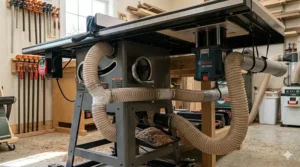
The Kreg PRS5000 takes a different approach entirely: transform your existing cabinet saw extension wing into a precision router station without replacing the entire saw. This 9.25-inch x 11.75-inch aluminum plate fits virtually all standard router table openings and accepts 20+ popular router models without adapters—making it the perfect solution for woodworkers who already own a quality cabinet saw but lack integrated routing capability.
The Precision Router Lift’s genius lies in its micro-adjustment system. Each full crank rotation moves the bit height exactly 1/16 inch, while the graduated scale shows fractional markings down to 1/64 inch with hash marks every 0.0002 inches between. For production work requiring identical profiles across multiple pieces, this repeatability eliminates the guesswork that plagues under-table router adjustments. You’re setting bit height from above the table with precision that matches measurements, not eyeballing depths and hoping for the best.
What the spec sheet doesn’t emphasize: the four-post lifting system prevents router tilt under load, an issue with cheaper lifts that use single-post designs. When you’re routing deep mortises or heavy edge profiles, that lateral stability translates directly into cleaner results. The lift accommodates routers from compact fixed-base models up to 3.5 HP plunge routers, though you’ll want to verify your specific model against Kreg’s compatibility chart.
Customer reports consistently highlight the installation simplicity—you’re mounting a plate into an existing opening, not rebuilding your entire extension table. The average installation takes 30-45 minutes including router mounting. One gotcha that trips up first-time buyers: you’ll need to create or purchase an extension wing with the router cutout if your cabinet saw doesn’t already have one, adding $150-$300 to the project depending on whether you DIY or buy factory.
Pros:
✅ Retrofit any cabinet saw without replacing entire extension
✅ Micro-adjustment dial delivers 1/64-inch precision
✅ Compatible with 20+ router models (Bosch, DeWalt, Porter-Cable, etc.)
Cons:
❌ Requires existing extension table with proper cutout opening
❌ Doesn’t include fence system (add $200-$300 for quality fence)
Pricing runs $350-$450 for the lift alone. For woodworkers who’ve already invested in a quality cabinet saw and want routing capability without starting over, this represents the most cost-effective path. The combination of your existing saw’s stability with Kreg’s precision lift delivers results comparable to fully integrated systems at a fraction of total investment.
7. Bosch RA1181 – Adaptable Benchtop Solution for Space-Conscious Shops
The Bosch RA1181 technically operates as a standalone benchtop router table, but creative woodworkers discovered its 27-inch x 18-inch aluminum top adapts brilliantly to cabinet saw extension installations. While Bosch markets this as a benchtop unit, the rigid aluminum mounting plate and generous table dimensions make it viable for converting an extension wing into a functional router station—particularly for smaller shops where space limitations rule out dedicated router cabinets.
The aluminum construction (versus cast iron on premium options) cuts weight to approximately 30 pounds, making it easily portable between benchtop use and table saw mounting. The pre-drilled router plate accepts most major router brands through included hardware, while the tall aluminum fence (4-7/8 inches high) with adjustable MDF faceplates accommodates taller workpieces than typical benchtop tables. The 2.5-inch dust collection port fits standard shop vacuum hoses, and two adjustable featherboards mount either to the fence or table surface for workpiece control.
From a real-world integration perspective, mounting the RA1181 to replace a cabinet saw extension wing requires some DIY fabrication—you’re either bolting the aluminum table directly to your saw’s rails or creating a support frame. This isn’t plug-and-play like purpose-built systems, but for woodworkers comfortable with basic metalworking, the adaptation saves $1,500-$2,000 versus factory router extensions. The aluminum surface provides surprisingly smooth workpiece glide once you apply paste wax, though it can’t match cast iron’s vibration damping for heavy routing operations.
Customer feedback splits along skill lines: experienced woodworkers appreciate the adaptability and price point, while beginners find the mounting adaptation frustrating compared to bolt-on solutions. The table excels at edge routing and light profile work but shows limitations with heavy raised-panel bits where the aluminum table transmits more vibration than cast iron alternatives.
Pros:
✅ $220-$280 price point opens router table capability to tight budgets
✅ 30-pound weight allows easy repositioning between applications
✅ Compatible with most major router brands via included hardware
Cons:
❌ Requires custom mounting for cabinet saw integration
❌ Aluminum construction dampens vibration less than cast iron
❌ Plastic components (legs, guards) reduce durability versus all-metal designs
For woodworkers operating in space-limited shops (garages, basements, small studios), the RA1181’s dual-purpose design—functioning standalone when needed, integrated when space permits—offers flexibility that dedicated systems can’t match. The savings versus premium options funds quality router bit investments that ultimately impact your work more than table construction material.
Setting Up Your Cabinet Saw Router Table: A Practical Integration Guide
Successfully integrating a router table with your cabinet saw requires more than bolting components together and hoping for the best. The initial setup determines whether you’ll enjoy seamless workflow transitions or spend half your shop time fighting fence alignment and dust clouds.
Electrical Planning: Power Distribution Matters
Cabinet saws typically demand 220-240V circuits rated for 20-30 amps, depending on motor size. When you add router capability, you’re introducing another power-hungry tool that can draw 15 amps at peak load. The mistake most first-timers make? Plugging both into the same circuit, then wondering why the breaker trips mid-cut when both tools run simultaneously.
Here’s the reality: plan for separate circuits or install a subpanel that can handle combined loads. Your cabinet saw might pull 20 amps startup current, and if you’re running a 3 HP router simultaneously (common when using the router fence as a supplementary guide), you’re approaching 35 amps total draw. Standard residential breakers won’t sustain this, creating frustrating interruptions during complex operations.
Professional shops handle this by running dedicated 220V circuits for the cabinet saw and 110V circuits for the router, allowing independent operation without circuit conflicts. If you’re adapting an existing setup, consider a rotary phase converter for smooth power delivery that extends motor life beyond what straight 220V single-phase provides.
Dust Collection Integration: One Port, Two Tools
The beauty of integrated setups lies in dust collection efficiency—theoretically. In practice, most woodworkers discover their 4-inch dust port can’t simultaneously handle saw blade dust and router bit chips effectively. The solution requires strategic valve placement and understanding airflow dynamics.
Install a blast gate between your cabinet saw dust port and the router table connection point. This lets you direct full collection power to whichever operation you’re currently running. For the router table, position the collection port as close to the bit as possible—within 2 inches maximum—because router dust travels at higher velocity than saw dust and needs capture points positioned accordingly.
One overlooked detail: router dust tends toward finer particles that clog filters faster than saw dust. If you’re routing regularly, plan for more frequent filter cleaning or upgrade to cyclone-style collection that separates fine particles before they reach your filter. The $200-$300 investment in a cyclone separator saves countless hours of filter maintenance and improves actual suction performance noticeably.
Fence Coordination: Making Two Systems Work as One
Integrated systems with shared fence mechanisms (like the Grizzly G1023RLW’s Shop Fox Classic Fence) eliminate fence coordination headaches, but most setups require managing two independent fence systems. The workflow friction this creates is real—you’re constantly adjusting two fences, trying to maintain reference points, and losing time between saw and router operations.
The workaround successful woodworkers employ: establish a common reference point on both fences using a precision straightedge. Mount a stop block to your saw’s fence at a known distance from the blade (say, 12 inches), then set your router fence to the same measurement from bit center. Now your fence readings coordinate, letting you transfer measurements between operations with simple math rather than starting fresh each time.
For complex projects involving multiple saw and router operations, create a setup sheet documenting fence positions for each operation. This seems tedious initially but saves massive time on repeat projects—future cabinet runs become plug-and-play operations rather than rediscovery missions.
Real-World Workflow: Three User Profiles, Three Solutions
Understanding how different woodworkers use cabinet saw router combinations helps clarify which system matches your needs best. Let’s examine three actual workshop scenarios.
The Weekend Furniture Builder: 8-12 Hours Monthly
Meet Tom, who runs a corporate job weekdays and builds reproduction furniture Saturdays. His cabinet saw router table sees action monthly, primarily for edge profiles on table tops and decorative work on cabinet faces. Tom chose the Shop Fox W1819 with W1821 router attachment because the combined cost ($2,200) fit his hobby budget while delivering capabilities indistinguishable from premium options for his usage patterns.
Tom’s workflow focuses on efficiency: he’ll rip all stock for a project on the table saw, then switch to router operations for edge treatments and joinery work. The separate fence systems (saw fence versus router fence) don’t bother him because he’s completing saw operations in one session, router operations in another—not bouncing between them constantly. The cast iron router table handles his occasional raised panel work adequately, though he notes the aluminum router fence requires more careful securing than premium cast iron alternatives when using aggressive bits.
For weekend builders working 8-12 hours monthly, the $1,000-$1,500 saved versus premium combinations funds better bit sets and specialty jigs that impact project quality more than marginal equipment improvements. Tom’s setup proves that thoughtful mid-range choices deliver professional results when matched to realistic usage patterns.
The Professional Cabinet Maker: 40+ Hours Weekly
Sarah operates a custom cabinet shop with two employees, processing 15-20 kitchen installs annually. Her SawStop Professional Cabinet Saw with RT-TGP router table runs 40+ hours weekly, switching between ripping operations and router work dozens of times daily. The unified T-Glide fence system proves critical—she’s moving between dado cuts and profile routing constantly, and the shared fence eliminates 10-15 minutes of setup time per project that separate fence systems would demand.
Sarah’s workflow exemplifies integrated system advantages: she’ll rip drawer sides, immediately route drawer bottom grooves using the same fence position, then switch back to the saw for crosscutting without fence adjustments. The SawStop flesh-detection technology paid for itself within six months—a near-miss incident when an employee’s hand slipped during bit changing would have resulted in severe injury with conventional equipment.
For production shops billing $75-$100 hourly, the time savings from integrated fences and instant operation switching compound quickly. Sarah calculates the SawStop combination saves 3-4 hours weekly versus separate machines, translating to $300-$400 recovered weekly or $15,000-$20,000 annually—making the premium pricing rational from pure business economics.
The Hobbyist Upgrader: Building Workshop Capabilities
Carlos spent years with a contractor saw and handheld router before deciding to upgrade his home shop. Rather than purchasing an integrated system, he installed a Kreg PRS5000 router lift in his new Grizzly cabinet saw’s extension wing, creating router capability for $400 versus $2,000+ for factory solutions. His approach reflects budget-conscious capability building—starting with quality foundational equipment (the cabinet saw) then adding routing functionality as projects demanded it.
Carlos’s workflow splits 70% saw operations, 30% routing, making the retrofit approach perfect for his usage balance. He routes primarily edge profiles and occasional dadoes for bookcase projects, operations that don’t demand the heavy-duty capacity of 5 HP motors or industrial-grade router tables. The Kreg lift’s micro-adjustment capabilities actually exceed what some integrated systems provide, giving him precision that matches his furniture-making aspirations.
For woodworkers building workshop capabilities over time rather than investing everything upfront, the retrofit approach using quality components like Kreg’s router lift creates a system that grows with skill development. Carlos plans to upgrade to a premium router fence eventually, but for now, a shop-built fence serves his needs while he masters routing techniques.
Common Mistakes When Buying Cabinet Saw with Router Table
After reviewing hundreds of user experiences and talking with woodworkers across skill levels, several purchasing mistakes emerge repeatedly. Avoiding these saves both money and frustration.
Mistake #1: Underestimating Motor Power Requirements
The most common error is assuming a 3 HP motor handles all routing operations equally. Reality check: edge routing and light profile work run fine on 3 HP, but raised panel bits and large-diameter cutters bog down smaller motors, causing RPM variations that telegraph into your workpiece as burn marks and inconsistent profiles. If your work involves door making with cope-and-stick or raised panel routing, the 5 HP motor premium ($800-$1,000) pays back through eliminated ruined workpieces and time savings.
One woodworker calculated he wasted $300 in materials over six months fighting inconsistent profiles from an underpowered motor before upgrading to 5 HP—negating much of his initial savings from buying the smaller motor. Match your motor to your heaviest expected operation, not your typical operation.
Mistake #2: Ignoring Fence System Compatibility
Separate fence systems for saw and router operations sound manageable initially, until you experience the workflow friction of constant adjustments between operations. If you’ll be switching between saw and router work multiple times per project (typical for cabinet making), unified fence systems justify their premium pricing through time savings alone. Calculate your hourly shop rate—if separate fences add 15 minutes per project and you complete two projects weekly, that’s two hours monthly or 24 hours annually. At even $50/hour shop rates, you’re sacrificing $1,200 annually in productivity to save $500-$800 on equipment.
The reverse applies too: weekend hobbyists working distinct operation sessions don’t benefit proportionally from unified fences. Match fence system sophistication to your actual workflow patterns, not idealized scenarios.
Mistake #3: Overlooking Electrical Infrastructure Costs
Cabinet saws require 220-240V power, and many home shops lack this capability. Before purchasing, get electrical quotes—running new circuits often costs $500-$1,200 depending on panel proximity and local electrical rates. Factor this into total project cost, as it can shift value calculations significantly. A $2,400 saw becomes a $3,200 investment once electrical work completes, potentially making the $2,800 saw with included installation support the better value.
One approach that saves money: if you’re building a new workshop or renovating an existing space, coordinate cabinet saw installation with other electrical work to reduce electrician trip charges and optimize circuit layout from the start.
Mistake #4: Buying Router Table Size That Doesn’t Match Stock Dimensions
Router table dimensions matter more than casual buyers realize. A 27-inch x 16-inch table handles most furniture and cabinet work comfortably, but if you’re regularly routing 36-inch wide panels or working with sheet goods, that surface area becomes limiting fast. Conversely, larger router tables (30-inch x 20-inch) consume more cabinet saw real estate, potentially reducing rip capacity or creating awkward workshop layouts in tight spaces.
Measure your typical workpiece dimensions before committing to router table size. If 80% of your work involves stock under 24 inches wide, the compact tables work perfectly. If you’re regularly handling full sheet goods or wide table tops, invest in larger router surfaces even if it means sacrificing some saw table extension.
Cabinet Saw Router Solutions vs Traditional Separate Stations
Understanding how integrated systems compare to traditional separate router table setups clarifies when combination machines make sense and when they don’t.
Space Efficiency: The Undeniable Advantage
A quality standalone router table with adequate surface area occupies roughly 24-30 square feet of floor space (table footprint plus operator working envelope). Your cabinet saw requires similar space. Integrating both into one station reclaims 20-25 square feet—in a 200 square foot shop, that’s 10-12% of total space returned for additional tool placement or improved workflow clearance.
The space savings compound in smaller workshops where equipment density impacts safety and comfort. One-car garage shops (roughly 200-250 square feet) can incorporate professional capabilities without creating cramped, unsafe working conditions when using integrated systems.
Workflow Velocity: Where Integration Shines
Project timing reveals integration advantages clearly. Building a cabinet face frame on separate machines involves: ripping stiles and rails (saw), routing cope-and-stick joints (router), ripping panel stock (saw), routing raised panels (router). Each machine transition requires fence adjustments, dust collection port switching, and mental context changes that consume 5-10 minutes per transition.
Integrated systems with shared fences reduce transition time to under 2 minutes—you’re moving the workpiece, not rebuilding entire setups. For projects requiring multiple transitions (the face frame example involves four major transitions), you’re saving 12-20 minutes per project. Professional shops completing 2-3 projects weekly save 1.5-3 hours weekly or 75-150 hours annually—quantifiable productivity gains worth thousands in recovered billable time.
Vibration Control: The Physics Advantage
Cabinet saws weigh 400-600 pounds, creating mass that absorbs router vibration far more effectively than standalone router tables (typically 80-150 pounds with router installed). This manifests as cleaner edge profiles, particularly when routing figured woods or working near grain transitions where chatter marks typically appear.
Professional furniture makers report noticeably improved edge quality when switching from standalone router tables to cabinet saw integrated systems, attributing the difference to vibration dampening from the saw’s mass. For decorative work where edge quality determines perceived craftsmanship, this quality improvement justifies integrated systems beyond pure convenience factors.
The Flexibility Trade-Off
Separate machines offer independent operation—two woodworkers can use saw and router simultaneously, doubling shop throughput in multi-person operations. Integrated systems create bottlenecks when multiple users need different tools. For shops with 2+ woodworkers regularly collaborating, maintaining separate stations preserves workflow flexibility that integration sacrifices.
Safety Considerations for Cabinet Saw Router Table Combinations
Combining two powerful woodworking tools into one station introduces unique safety considerations beyond standard cabinet saw or router table operation. Following OSHA guidelines for woodworking machinery operations helps prevent the accidents that account for over 30,000 annual table saw injuries in the United States, according to the U.S. Consumer Product Safety Commission.
Point of Operation Protection
OSHA standards (29 CFR 1910.213) require that both saw blade and router bit point of operations be properly guarded during use. For integrated systems, this means maintaining appropriate blade guards for the saw side while ensuring router fencing and bit guards protect against inadvertent contact on the router side. The challenge emerges when switching between operations—woodworkers often remove saw guards for specific cuts, then forget to reposition them before returning to standard operations.
Establish a post-operation checklist: before walking away from either the saw or router, verify that appropriate guards are reinstalled and dust collection connected. This takes 30 seconds but prevents the majority of contact injuries that occur when returning to a tool configured for different operations than currently needed.
Dust Collection Health Considerations
Routing generates significantly finer dust particles than saw operations, with particle sizes often below 10 microns that penetrate standard dust masks easily. When operating integrated systems, your dust collection must effectively capture both coarse saw dust and fine router particles—requiring either dual-stage collection or high-efficiency filters rated for sub-10 micron particles.
Consider this: the Occupational Safety and Health Administration recognizes woodworking dust as a respiratory hazard requiring engineering controls beyond personal protective equipment alone. For integrated systems running both saw and router operations, this means investing in proper dust collection (cyclone separators, HEPA filtration) rather than relying solely on shop vacs and basic filters.
Kickback Risk Management
Cabinet saws use riving knives and anti-kickback pawls to prevent workpiece ejection during ripping operations. Router tables lack equivalent kickback protection, making proper feed direction and fence positioning critical for safety. The danger with integrated systems is developing complacent habits on the “safe” saw side that transfer inappropriately to router operations.
Router kickback occurs differently than saw kickback—the workpiece often pulls inward toward the bit rather than ejecting backward, bringing operators’ hands toward the spinning cutter. Proper technique requires feeding workpieces right-to-left against bit rotation, maintaining firm downward and forward pressure, and never standing directly in line with potential kickback paths.
Power Isolation and Lockout Procedures
When performing maintenance or bit changes on integrated systems, power isolation becomes critical. The mistake many woodworkers make is disconnecting power to the router while leaving the cabinet saw connected, or vice versa, creating scenarios where accidental startup occurs during maintenance.
Best practice: install a master power disconnect for the entire cabinet saw station that cuts power to both saw motor and router simultaneously. This prevents confusion about which tool is isolated and ensures that maintenance operations on either side occur with both tools completely de-energized. The added cost is minimal (roughly $50-$80 for a proper disconnect switch) but eliminates an entire category of startup-during-maintenance accidents.
FAQ: Cabinet Saw Router Table Integration
❓ How much space do I actually save combining a cabinet saw with router table versus separate units?
❓ Can I use trim routers with cabinet saw router table combinations?
❓ What's the biggest difference between 3 HP and 5 HP motors for router operations?
❓ Do unified fence systems really save enough time to justify premium pricing?
❓ What electrical requirements should I plan for before installing a cabinet saw router combination?
Conclusion: Matching Systems to Workshop Reality
The cabinet saw with router table represents more than convenient space savings—it’s a fundamental workflow optimization that transforms how efficiently you move from rough milling to finished profiles. The right combination depends less on which system costs most and more on honestly assessing your actual usage patterns, shop constraints, and operational priorities.
For production cabinet makers switching between saw and router operations constantly, integrated systems with unified fences (SawStop RT-TGP, Grizzly G1023RLW) deliver time savings that justify premium pricing through recovered billable hours alone. The weekly time recapture compounds into thousands of dollars annually for shops billing at professional rates, making the economics straightforward despite higher upfront costs.
Weekend furniture builders working 8-12 hours monthly benefit more from value-focused combinations like the Shop Fox W1819 with W1821 attachment, where the $1,000-$1,500 savings versus premium options funds better router bit investments that impact project quality more directly than marginal equipment improvements. The separate fence systems that frustrate production shops barely register for hobbyists completing distinct operation sessions rather than constant switching.
Woodworkers building workshop capabilities over time find retrofit solutions like the Kreg PRS5000 router lift create professional routing capability for $400 versus $2,000+ factory systems, letting you start with quality foundational equipment then add functionality as projects demand it rather than committing everything upfront.
The common thread across successful implementations? Matching system capabilities to realistic workflow needs rather than theoretical maximums. A 5 HP motor makes sense for daily raised panel work but wastes money for routing primarily edge profiles. Unified fences deliver value when you’re constantly switching operations but create no advantage for sequential work sessions.
Before committing to any cabinet saw router table combination, document your actual shop usage: How many hours weekly do you operate both tools? What percentage of projects involve multiple transitions between saw and router operations? Does your shop have adequate electrical infrastructure, or will you need $500-$1,200 in circuit upgrades? Do your typical workpiece dimensions fit the router table size, or will you constantly fight insufficient surface area?
These practical considerations determine which system optimizes your specific workshop reality far more than comparing spec sheets or chasing premium features you’ll rarely use.
Recommended for You
- 7 Best 5 HP Cabinet Table Saw Models — 2026
- Best Powermatic Cabinet Saw 2026: 7 Models That Transform Your Workshop
- 7 Best SawStop Cabinet Saw Models 2026
Disclaimer: This article contains affiliate links. As an Amazon Associate, I earn from qualifying purchases. If you purchase products through these links, we may earn a small commission at no additional cost to you.
✨ Found this helpful? Share it with your friends! 💬🤗
